Modigirl Script: The Elegant Typeface for Modern Web Design
I was halfway through a redesign for a boutique lifestyle brand when I hit that familiar wall. The layout was clean, the grid was solid, but the hero section felt lifeless. The client wanted something that screamed "handcrafted" and "premium" without looking dated or messy. That's when I pulled Modigirl Script from my library. As soon as I dropped it into the headline slot, the entire mood of the page shifted. It wasn't just a font change; it was an instant injection of personality.
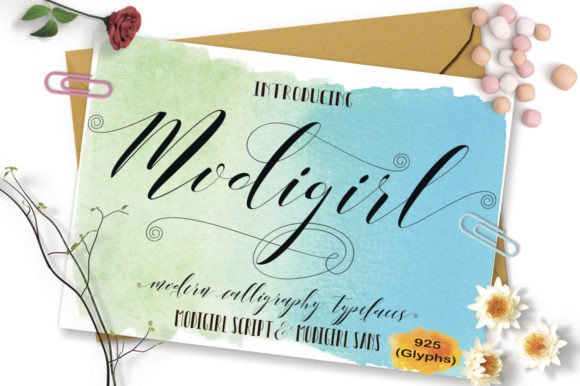
Part of the Script Amp collection, this typeface stands out because it balances fluidity with structure. In the world of web design, finding a script font that doesn't sacrifice readability on mobile devices is a constant challenge. Modigirl Script solves this by offering 925 unique handmade glyphs. That staggering number isn't just a statistic; it translates directly to better brand identity. When you have that many alternates and ligatures, your headlines never look repetitive. Every time the font renders, it feels slightly organic, mimicking the natural variation of human handwriting while maintaining the consistency required for a professional digital product.
Elevating Hero Sections and Landing Pages
The first place I tested Modigirl Script was the hero banner. For a coaching website or a course sales page, the headline is the most critical real estate. You need a display font that grabs attention immediately but still invites the user to read further. Because Modigirl Script has such elegant strokes, it works beautifully over image backgrounds, provided you manage the contrast correctly.
In my recent project, I placed the font over a soft, textured photograph. To ensure readability, I added a subtle gradient overlay behind the text. The result was stunning. The font's thick and thin transitions created a dynamic visual rhythm that guided the eye straight to the call-to-action button. Unlike some handwritten fonts that can feel too casual or childish, Modigirl carries a sense of sophistication. It tells the visitor that the brand behind the screen cares about details. This level of polish is essential for building trust, especially when you are asking users to sign up for a newsletter or purchase a high-ticket item.
Creating Visual Hierarchy with 925 Glyphs
One of the biggest advantages of using a font with nearly a thousand glyphs is the ability to create custom typographic compositions. In editorial design and packaging design, designers have long used alternate characters to avoid awkward letter collisions. Now, we bring that same level of craft to online stores and portfolio sites.
When designing a product landing page, I often use different alternates for the same word in different sections to keep the visual experience fresh. For instance, if the brand name appears in the header and again in a testimonial section, swapping the glyph for the capital "M" or the lowercase "g" prevents the design from feeling static. This subtle variation keeps the user engaged as they scroll. It adds a layer of depth that standard system fonts simply cannot achieve. It makes the creative font feel like a bespoke asset rather than a generic template choice.
Practical Readability and Mobile Responsiveness
While aesthetics are crucial, UX-aware design demands that we prioritize function. A beautiful font is useless if users can't read it on their phones. Modigirl Script performs surprisingly well on smaller screens, but it requires careful handling. I always recommend using it for short phrases, logos, or section headings rather than long blocks of body copy.
For body text, pairing this premium font with a clean sans serif font is the best approach. The contrast between the flowing script and a geometric sans serif creates a balanced hierarchy. The sans serif handles the heavy lifting of information delivery, while Modigirl Script acts as the emotional anchor. On mobile devices, ensure the font size is large enough—usually no smaller than 24px for headings—to prevent the delicate strokes from blurring together. Also, be mindful of line height. Script fonts need more breathing room between lines to maintain their legibility and elegance.
Strategic Font Pairing for Brand Consistency
Choosing the right partner for Modigirl Script can make or break your digital brand kit. If you are building a site for a luxury goods store, pairing it with a classic serif font can enhance the editorial feel. However, for a modern SaaS founder or a tech-savvy entrepreneur, a minimalist sans serif provides a contemporary edge that keeps the brand looking forward-thinking.
I recently used this combination for a blog redesign. The blog titles were set in Modigirl Script, giving each post a personal, inviting touch, while the article content remained in a highly readable sans serif. This mix allowed the blog to feel warm and approachable without sacrificing the professionalism needed for serious topics. It's a perfect example of how modern typography can bridge the gap between personal expression and corporate credibility.
Implementation Tips for Web Developers
Before launching Modigirl Script on a live server, there are a few technical checks to run. Since this is a feature-rich typeface, the file size might be larger than a standard web font. To ensure fast-loading visual content, consider subsetting the font to include only the characters and languages you actually need. Most modern commercial font licenses allow for web embedding, but always double-check the specific terms regarding traffic limits and domain usage.
Also, take advantage of the OpenType features if your CSS setup supports them. Enabling contextual alternates ensures that the browser automatically selects the most appropriate glyph connections, making the text flow even more naturally. This small tweak can significantly improve the perceived quality of your logo design and social media graphics generated from the same brand assets.
Ultimately, integrating Modigirl Script into your workflow is about more than just picking a pretty face. It's about selecting a tool that enhances your storytelling. Whether you are crafting a campaign landing page, refreshing a small business website, or designing a new course interface, this typeface offers the versatility and charm needed to stand out in a crowded digital landscape. By focusing on readability, smart pairing, and strategic placement, you can transform a standard layout into a memorable brand experience that resonates with your audience.