Magnolia: A Premium Handwritten Typeface for Modern Web Design
In the crowded landscape of digital products, establishing an immediate emotional connection with users is paramount. As web designers and UI creators, we often rely on layout grids and color palettes to guide user behavior, but typography remains the most potent tool for conveying brand personality. Enter Magnolia, a stunning handwritten font that bridges the gap between personal touch and professional elegance. Sourced from the curated collection at Script Amp, this typeface offers a unique opportunity to infuse warmth into cold screen interfaces without sacrificing readability or style.
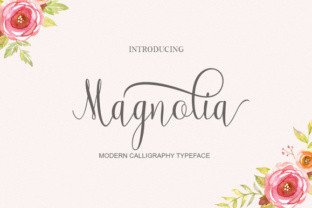
Magnolia is not merely a decorative element; it is a strategic design asset. With a massive set of almost 350 glyphs, it provides the versatility needed for complex digital environments. Unlike many script fonts that feel repetitive due to limited character sets, Magnolia's extensive glyph count allows for natural ligatures and varied stroke endings. This creates a fluid, organic rhythm in headlines and hero sections, mimicking the nuance of actual handwriting. For digital product creators, this means your landing pages and app screens can feel bespoke rather than templated.
Elevating Visual Hierarchy in Digital Layouts
The primary challenge in web design is guiding the user's eye through a hierarchy of information. Magnolia excels as a display font, making it ideal for hero titles, section headings, and call-to-action areas where you need to stop the scroll. Its elegant curves and fancy aesthetic draw attention immediately, signaling importance. When used in a conversion-focused layout, such as a course sales page or a boutique online store banner, Magnolia acts as a visual anchor.
However, effective use requires restraint. Because of its decorative nature, Magnolia is best reserved for short phrases, logo text, and decorative accents rather than long-form body copy. Using a handwritten font for paragraphs can cause eye fatigue and reduce scanning efficiency on mobile devices. Instead, pair Magnolia with a clean sans serif font for body text to maintain high readability while letting the script shine in headers. This contrast creates a sophisticated editorial look that feels both modern and approachable.
Strategic Applications for Brand Identity
For SaaS founders and creative entrepreneurs, the tone of voice extends beyond copy; it is embedded in the typeface. Magnolia conveys a sense of luxury, care, and femininity, making it perfect for brands in the wellness, beauty, coaching, and lifestyle sectors. Imagine a coaching website where the main value proposition is written in Magnolia against a soft, neutral background. The font choice alone suggests a personalized, high-touch service.
- Landing Pages: Use Magnolia for the primary headline to create an instant emotional hook.
- Online Stores: Apply it to product category banners or "New Arrival" badges to add a boutique feel.
- Portfolio Sites: Utilize the font for project titles to showcase creativity and attention to detail.
- Digital Ads: Leverage its legibility in social media graphics to stand out in fast-moving feeds.
When building a consistent online identity, consistency is key. If you choose Magnolia for your website headers, carry it over to your email newsletters, PDF guides, and social media templates. This repetition reinforces brand recognition. The font's ability to feel "fancy" yet accessible helps build trust; it suggests that the brand behind the screen values aesthetics and quality, which translates to perceived value in the products or services offered.
Optimizing Readability Across Devices
One of the critical considerations when selecting a script font for the web is how it renders on different screen sizes. Magnolia's open counters and distinct letterforms generally perform well, but responsive design requires careful testing. On mobile screens, ensure that the font size is large enough to prevent the intricate details of the handwriting from blurring together. A good rule of thumb is to increase the line height slightly when using Magnolia in sub-headings to allow the ascenders and descenders to breathe.
Contrast is another vital factor. Magnolia shines on light backgrounds, but it can also work effectively on dark backgrounds if the weight is sufficient. Avoid placing it over busy image overlays unless you apply a solid color block or a heavy drop shadow behind the text. For buttons, use Magnolia sparingly; it works best on larger "primary action" buttons where the text is short, such as "Join Now" or "Get Access." For smaller utility links, stick to a standard sans serif to ensure clickability and clarity.
Technical Considerations and Font Pairing
From a technical standpoint, integrating Magnolia into your stack is straightforward thanks to modern webfont standards. When downloading from Script Amp, you will typically receive files in formats suitable for both desktop design software (like Figma or Adobe XD) and web implementation (WOFF/WOFF2). Before launching, always check the included styles and alternates. With nearly 350 glyphs, you likely have access to swash characters or alternate endings that can be toggled via CSS font-feature-settings to create unique variations for different sections of your site.
Pairing is where the magic happens. While Magnolia brings the personality, it needs a supportive partner. A geometric sans serif like Montserrat or a humanist option like Lato provides a stable foundation for body copy, creating a balanced typographic scale. Alternatively, for a more traditional, editorial digital identity, pair it with a modern serif font for pull quotes or introductory text. This combination evokes the feeling of a high-end magazine, perfect for content-heavy blogs or thought leadership platforms.
Finally, remember the importance of licensing. As a commercial font, Magnolia requires the appropriate license for use in client projects, online stores, and digital templates. Ensure you have the correct webfont license to embed the typeface legally on your domains. This protects both you and your clients from legal issues and supports the type foundry in continuing to create high-quality design assets.
In conclusion, Magnolia is more than just a pretty face; it is a functional tool for enhancing user engagement and defining brand tone. By understanding its strengths as a display typeface and respecting its limitations regarding readability, web designers can create digital experiences that are not only visually stunning but also deeply resonant with their target audience. Whether you are designing a new app interface or refreshing an e-commerce store, Magnolia offers the elegance and versatility needed to make a lasting impression.